Free Receipt Templates (Word & PDF)
Download a blank receipt template to edit in Word or print and fill in by hand, or open the same layout in our free online generator, which does the math and gives you a PDF in a minute. No sign-up for either.
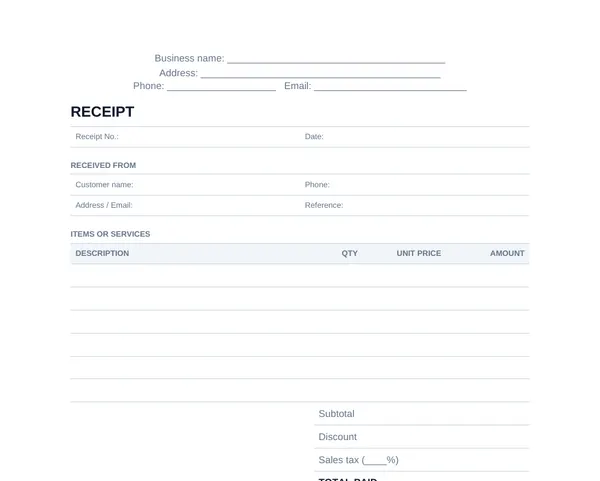
General receipt template
For any sale or service: a numbered receipt with your business details, the customer, up to six items, subtotal, discount, sales tax, total paid, payment method and a signature line.
- Editable receipt templateWord · 11 KBReplace the bracketed placeholders with your business and customer details. Opens in Microsoft Word, Google Docs, Pages and LibreOffice.Download Word
- Printable blank receiptPDF · 49 KBA one-page US Letter receipt with lines for six items, tax, total and payment method, to fill in by hand.Download PDF
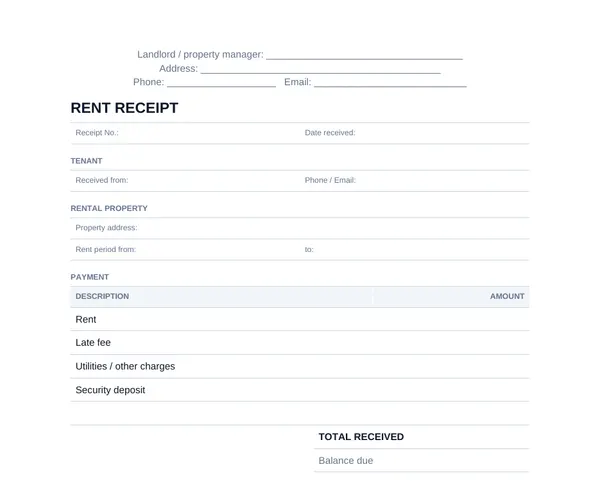
Rent receipt template
For landlords and property managers: tenant, property address, rent period, late fees, balance due and who received the payment. Includes a 3-per-page receipt book.
- Editable rent receipt templateWord · 11 KBReplace the bracketed placeholders with your details. Works in Microsoft Word, Google Docs, Pages and LibreOffice.Download Word
- Printable rent receiptPDF · 42 KBA full-page blank receipt with room for rent, late fees, other charges and balance due.Download PDF
- Rent receipt book (3 per page)PDF · 31 KBThree compact receipts per sheet with cut lines, ideal for landlords who collect rent in person.Download PDF
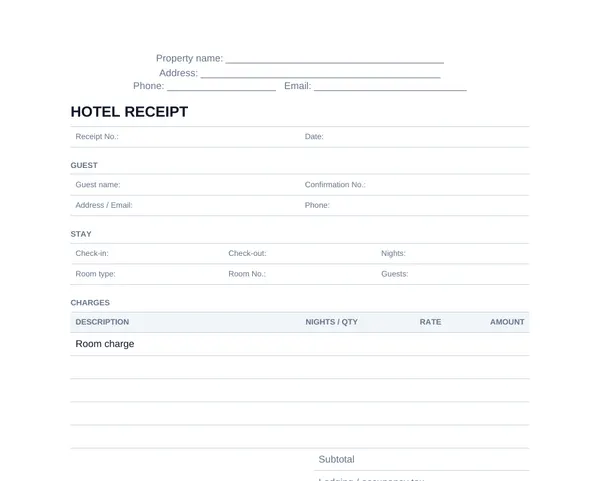
Hotel receipt template
For B&Bs, inns, motels and short-term rentals: guest, check-in and check-out dates, room and nightly rate, lodging tax and deposit.
- Editable hotel receipt templateWord · 11 KBReplace the bracketed placeholders with your property and guest details. Opens in Microsoft Word, Google Docs, Pages and LibreOffice.Download Word
- Printable blank hotel receiptPDF · 52 KBA one-page US Letter form with blank lines to fill in by hand. Print a few copies to keep at reception.Download PDF
More receipt templates you can fill in online
These open the free generator with an example already filled in for that kind of sale. Replace the example with your own details and download a PDF.
Word, PDF or online: which receipt template to use
The Word template suits you if you already keep business documents on your computer: save one copy per receipt, type in the details and print or export it. You have to add up the totals yourself, so double-check the math before you send it.
The printable PDF is for receipts written by hand: print a stack, keep it at the counter or in your car, and tear one off at the moment you are paid. It is the quickest option when you collect cash in person, as long as you keep a copy for yourself.
The online generator is the fastest for most people. It works on a phone, calculates the subtotal, tax and total for you, and produces a clean PDF you can email straight away. What you type stays in your browser and is never uploaded to our servers.
How to fill out a receipt template
- 1
Pick the right template
Use the general receipt for sales and services, and the rent or hotel version when you need a rent period or stay dates.
- 2
Add your details at the top
Your business or personal name, address and a phone number or email, so the customer knows who issued the receipt.
- 3
Number and date it
Give every receipt its own number, such as 2026-014, and write the date the money was received.
- 4
List what was paid for
One line per item or service with the quantity, unit price and amount. Add tax and any discount below the items.
- 5
Record the payment
Tick how the customer paid and write the total paid. For checks, add the check number.
- 6
Sign and keep a copy
Sign the receipt, give the original to the customer and keep a copy or scan for your own records.
Want to see every part labeled? Read how to make a receipt, or compare receipts and invoices if you are not sure which one you need.
Making the same receipt every month?
Receiptpress Pro remembers your last receipt and your business details, adds your logo and removes the footer, so next month’s receipt takes one click.
Receipt template FAQ
Is there a free receipt template in Word?
Yes. Every template on this page has an editable Word version (.docx). Replace the bracketed placeholders, save a copy for each receipt and print it or send it as a PDF.
Can I use these receipt templates in Google Docs?
Yes. Upload the Word file to Google Drive and open it with Google Docs. The layout carries over, and you can download each finished receipt as a PDF from the File menu.
Is there an Excel receipt template?
We don’t offer an Excel version. If you want totals calculated for you, use the free online receipt generator instead: it adds up the items, applies tax and discounts and gives you a PDF without any formulas.
Do receipts need to be numbered?
Numbering isn’t legally required everywhere, but it is good practice. A unique number lets you and your customer refer to a payment later and makes gaps or duplicates easy to spot.
Can I add my logo to a receipt template?
In the Word template, replace the business name placeholder with your logo image. In the online generator, Receiptpress Pro adds your logo to every PDF and removes the small Receiptpress footer.
Are these receipt templates free to use for my business?
Yes. You can download, edit, print and use them for your own business at no cost. Please only issue receipts for payments you have actually received.
Examples and guides
- How to Make a ReceiptA labeled example and the 7 steps to writing any receipt.
- Rent Receipt SamplesThree filled-in rent receipts and how to fill out each field.
- Receipt vs InvoiceThe difference, when to use each, and how to number receipts.
Receipts should only be issued for payments you have actually received. See our acceptable use policy.