How to Make a Receipt: Step-by-Step Guide
By the Receiptpress team · Published
To make a receipt, write your business details, a receipt number and the date, the customer’s name, an itemized list of what was paid for, the total with any discount and tax, and the payment method, then sign it and keep a copy. The example below shows where each part goes, and the steps explain how to fill it in.
The parts of a receipt
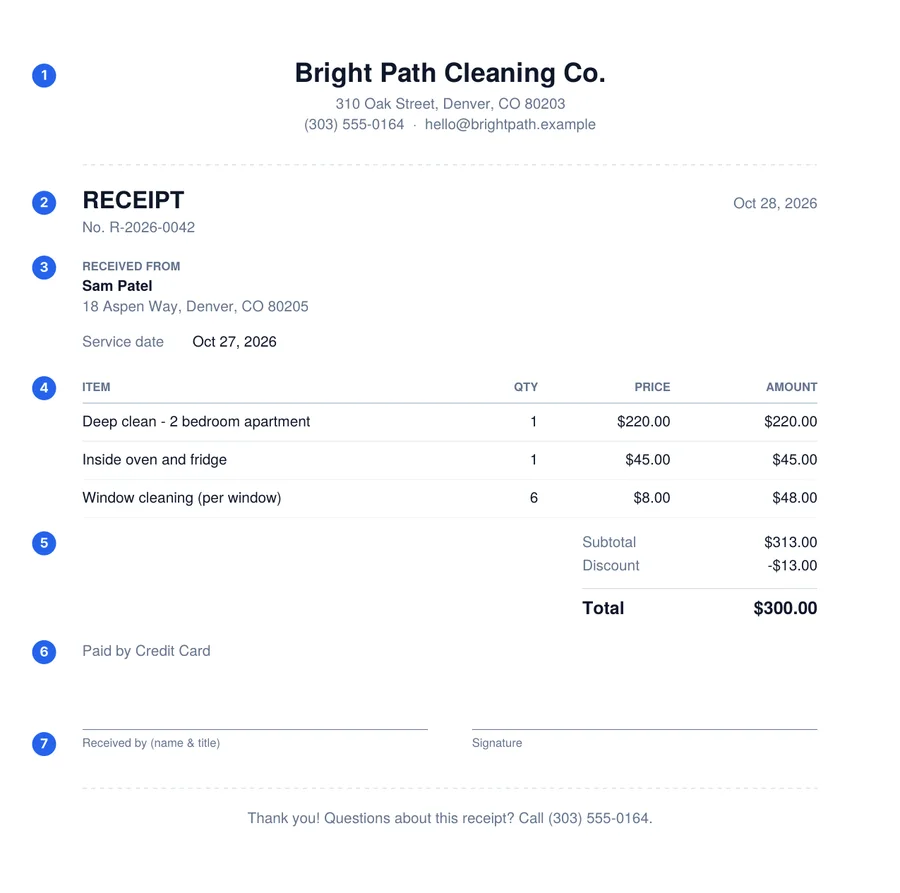
- 1Business name and contact details
- 2Receipt number and date
- 3Customer (who paid)
- 4Itemized products or services
- 5Subtotal, discount, tax and total
- 6Payment method
- 7Received by and signature
How to write a receipt in 7 steps
- 1
Put your business details at the top
Start with the name your customer knows you by, then your address and a phone number or email. If you’re a sole trader or freelancer, your own name is fine.
- 2
Add a receipt number and the date
Give every receipt a unique, sequential number such as R-2026-0042, and write the date the payment was received.
How to number receipts - 3
Say who paid
Write the customer’s name. Their address or email is optional for small sales but useful for larger ones and anything they may need for an expense claim.
- 4
List what was paid for
One line per product or service, each with a short description, quantity, unit price and amount. Add any extra detail the customer may need, such as the date a service was performed.
- 5
Show the subtotal, discount, tax and total
Add up the lines, subtract any discount, then add sales tax at the rate that applies to you. The total should be exactly what the customer paid.
- 6
Record how they paid
Cash, card, check (with the check number), bank transfer or another method. For part payments, also note the balance still owed.
- 7
Sign it and keep a copy
For printed receipts, add the name of the person who took the payment and a signature. Give one copy to the customer and keep one for your records.
Want to skip the formatting? The free receipt generator walks you through the same seven parts and calculates the totals for you.
Three ways to make a receipt
Online receipt generator
Best for: Most businesses and freelancers
Pros: Fastest, calculates totals and tax for you, consistent layout, easy to email as a PDF.
Cons: Needs a phone or computer.
Use the free receipt generatorWord or PDF template
Best for: People who prefer editing a document
Pros: Works offline, easy to customize, can be printed in bulk.
Cons: You do the math yourself, and copies can drift out of sync.
Browse receipt templatesHandwritten receipt book
Best for: Cash sales with no device at hand
Pros: No equipment needed, carbon copies give you an automatic duplicate.
Cons: Harder to read and search, easy to make arithmetic errors.
Printable rent receipt bookHow to write a receipt by hand
A handwritten receipt follows the same structure. Use a receipt book with carbon or carbonless copies so you keep a duplicate automatically, and pre-number the pages so no number is ever skipped or reused.
- Write clearly in ink and spell out the amount in words as well as figures for larger payments.
- Cross out any unused space in the item list so nothing can be added later.
- Sign the receipt and, if you made a mistake, void it and start a new one instead of correcting over the top.
Tips for small businesses
- Be consistent. Use the same layout and numbering for every receipt so they’re easy to file and search.
- Get sales tax right. Charge the rate that applies where you sell and show it on its own line.
- Send receipts digitally. A PDF by email is quick, can’t be lost in a pocket and gives you a sent copy.
- Know when you need an invoice instead. If the customer hasn’t paid yet, send an invoice; see receipt vs invoice.
Frequently asked questions
Can I make my own receipt?
Yes, for payments you have received. Any business or individual can issue a receipt for their own sales, services or rent. You can’t make a receipt on behalf of another business, such as a store you bought something from. Ask that business for a copy instead.
What makes a receipt valid?
There is no single official form. A receipt is generally accepted as a record when it clearly shows who was paid, who paid, the date, what the payment was for, the amount and the payment method. Some situations, such as rent in certain states, have extra requirements.
How do I make a receipt for a cash payment?
Follow the same steps and select Cash as the payment method. Because cash leaves no bank record, give the customer their copy right away, add a signature on printed copies and keep a duplicate for yourself.
Can I make a receipt on my phone?
Yes. The Receiptpress generator works in a mobile browser. Fill in the form, download the PDF and send it by email or text.
Do I need to give a receipt for every sale?
Rules vary by country, state and industry, but giving a receipt whenever a customer pays or asks for one is good practice. It protects both of you if a payment is ever questioned.